.png)
October 7, 2026
If your organization runs on spreadsheets, you’re not alone. For many teams, Smartsheet has become the go‑to way to modernize Excel: add some collaboration, automation, and dashboards, and suddenly the “spreadsheet that runs the business” feels a bit more manageable.
But as soon as you move beyond project tracking into enterprise risk, compliance, and complex workflows, that comfort starts to break down.
Process Tempo was built for that next step.
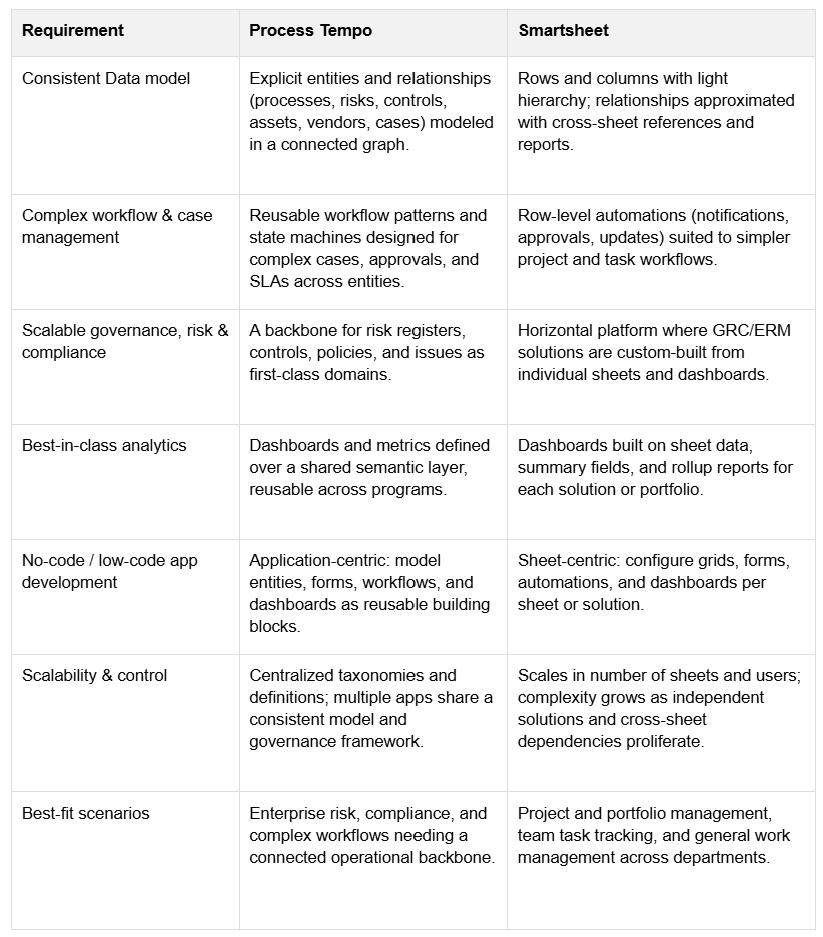
Where Smartsheet focuses on managing tasks and projects in flexible grids, Process Tempo focuses on modeling your business as a connected system of processes, risks, controls, people, and events. That difference in philosophy matters a lot when you’re trying to answer questions like:
This post explains why Process Tempo is often the smarter choice than Smartsheet when you need a durable, graph‑driven system of record for workflows and risk, not just a better spreadsheet.
Smartsheet is fundamentally sheet‑centric. You design grids—rows, columns, formulas—and then add views and automations around them. It’s a powerful model for:
Process Tempo starts from a different place: a formal data model and graph. Instead of asking, “What columns do we need on this sheet?” you ask, “What entities exist in our world, and how are they related?”
Things like:
All of these become first‑class entities connected by explicit relationships. On top of that, you define workflows, forms, and dashboards using a no‑code/low‑code design system.
The result: Smartsheet organizes tasks. Process Tempo organizes the business.
Spreadsheets are great at lists; they’re not great at relationships.
As your risk and workflow landscape grows, you quickly end up with:
Each new use case—third‑party risk, policy attestation, issue management—often becomes another cluster of sheets with its own logic and definitions.
In contrast, Process Tempo uses a graph database as the backbone. Relationships are not an afterthought; they are the structure:
Because everything is connected in a shared graph, you can ask richer questions without copy‑pasting data across sheets or rebuilding logic for each program.
Smartsheet offers rule‑based automations—if this row changes, send that email, request that approval, update that field. That’s ideal for simple, line‑of‑business workflows.
But enterprise workflows and case management introduce complexity that stretches this model:
Process Tempo’s workflow layer is designed for this level of complexity. You can define:
Instead of each team improvising a slightly different Smartsheet solution, you get consistent, governed workflows that still feel low‑code to configure.
Smartsheet is intentionally horizontal. It’s meant to be useful to marketing, operations, PMOs, HR—you name it. That flexibility is a strength, but it also means any GRC or ERM solution you build is effectively a custom app stitched together with sheets and automations.
Process Tempo is opinionated in the places that matter for governance and risk. It gives you:
This doesn’t lock you into a rigid template; it gives you a strong backbone on top of which you can build your unique programs without reinventing core concepts each time.
Both Smartsheet and Process Tempo support dashboards and reporting, but the underlying assumptions are different.
In Smartsheet, analytics are layered on top of sheets. You typically:
As your environment grows, keeping those rollups in sync becomes a project of its own.
Process Tempo treats analytics as a first‑class part of the platform:
That means you spend more time asking “What insight do we need?” and less time wondering “Which sheet has the right version of this metric?”
Smartsheet’s no‑code surface area is primarily around:
For many organizations, that’s more than enough for project work and operational tracking.
Process Tempo’s no‑code/low‑code layer—Jupiter—extends further into “application design” territory:
Instead of a collection of related sheets, you deliver full solutions that share a common backbone but can be deployed, configured, and governed as products.
A single Smartsheet solution can be elegant. The challenge arises when you have dozens or hundreds:
Over time, this creates a kind of spreadsheet‑driven shadow IT.
Process Tempo is designed to scale without that chaos by:
You still retain flexibility at the edge, but you keep a coherent, connected system at the core.
Smartsheet remains an excellent tool for what it was built to do: flexible, spreadsheet‑like work management across a broad range of teams.
Process Tempo is the smarter choice when:
If you’re already using Smartsheet today, Process Tempo doesn’t have to replace everything at once. Many organizations start by moving their most critical, relationship‑heavy processes—like enterprise risk, vendor management, or issue/case management—into a graph‑driven platform, then connect or retire spreadsheet-based solutions over time.
The result is a more resilient, transparent operational backbone that can grow with your business instead of fighting it.



Build enterprise-ready applications without writing code.
