October 11, 2026
A supplier misses a shipment. Your Neo4j graph reveals which ingredients, products, and customer orders are impacted. Now procurement needs to find an alternative supplier, assess the operational impact, and kickoff the necessary workflows to minimize the damage.
Building an enterprise-ready application means giving people a reliable way to explore relationships, make decisions, and complete work. Neo4j provides the connected data. Jupiter provides the user interface, the business rules, the permissions, and the workflows around it.
This guide explains how to build an enterprise-ready graph solution hwith Neo4j and Process Tempo Jupiter, using supplier disruption management as an illustrative example.
An enterprise-ready graph solution combines graph queries and graph visualization with the controls and operating practices needed for everyday business use. Users can investigate a problem, take authorized action, and follow the outcome. Administrators can manage access and support the application using a single control pane.
Before building, define what readiness means for your use case:
Neo4j offers official drivers and development tools for building custom applications. Its JavaScript driver, for example, connects applications to Neo4j and executes Cypher queries. [1] Jupiter offers another approach: build the interface and workflow within a shared application platform, then connect that application to your graph.
Start by defining the work the user needs to finish. For supplier disruption management, the objective is to assess exposure and coordinate an approved response.
A useful first version might support five steps: identify affected products and orders, open a remediation case, assign an owner, review an alternative, and approve or reject the proposed change. Each step needs a clear status, an accountable person, and a defined outcome.
Design for the people involved. An analyst investigates dependencies. A procurement specialist evaluates suppliers. A manager approves changes. An administrator manages access. These roles may share an application while using different screens and actions.
Agree on the process before designing a dashboard. Otherwise, an attractive graph can leave users with the same question they started with: what should I do next?
Identify the nodes, relationships, and properties that support the workflow. In this example, the graph connects suppliers to ingredients, ingredients to products, and products to customer orders. A remediation case could link to those entities so future users can recover the context behind the decision.
Jupiter supports connections to graph data and applications that read and write to backend systems. [2] Use queries that answer specific questions: which products depend on this supplier, which orders are affected, and which ingredients have another qualified source?
Use stable identifiers to connect screen selections to records. Keep query parameters separate from query text, limit the results to what users need, and test the queries against realistic data volumes. Neo4j's driver documentation also recommends parameterized queries rather than concatenating input into query strings. [1]
Decide where updates belong. The graph might store relationships and case context while an ERP remains the authority for purchase orders. Design the application around those ownership boundaries.
Voyager is Process Tempo's graph exploration environment. Jupiter 6.0 supports embedded Voyager graphs, custom styling, and node grouping. [3] These capabilities let designers place relationship exploration alongside the information people need to make a decision.
For supplier disruption management, design a screen with the dependency graph beside affected products, open orders, and relevant business metrics. Highlight the selected supplier and help users narrow the investigation instead of presenting every relationship at once.
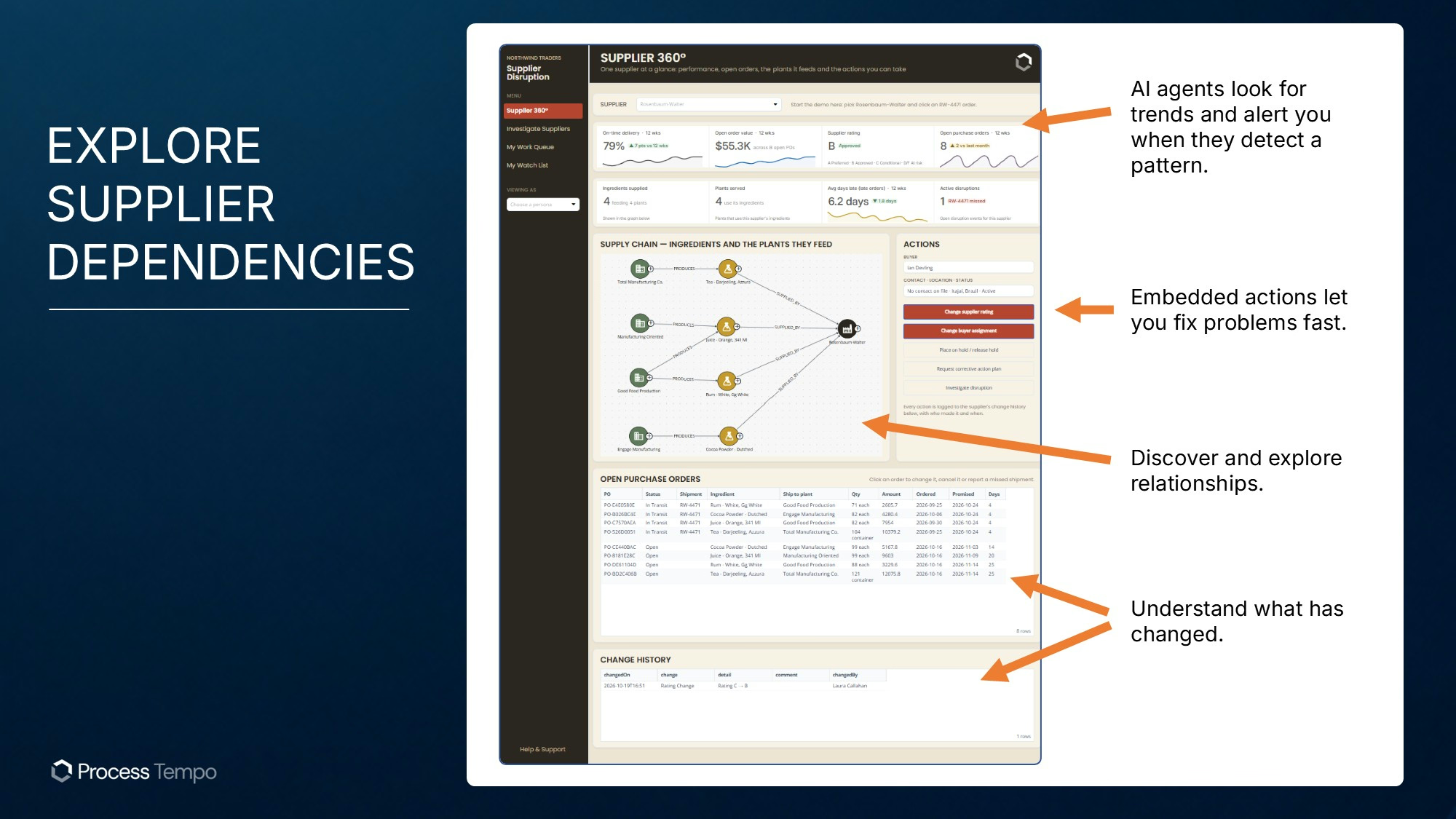
Voyager also supports snapshots that capture a graph view at a moment in time. [4] That gives colleagues a common view to discuss. An analyst can share the relevant dependency view with procurement instead of asking everyone to recreate the investigation. Record any additional evidence required by your case process; a visual snapshot alone is not a complete audit record.
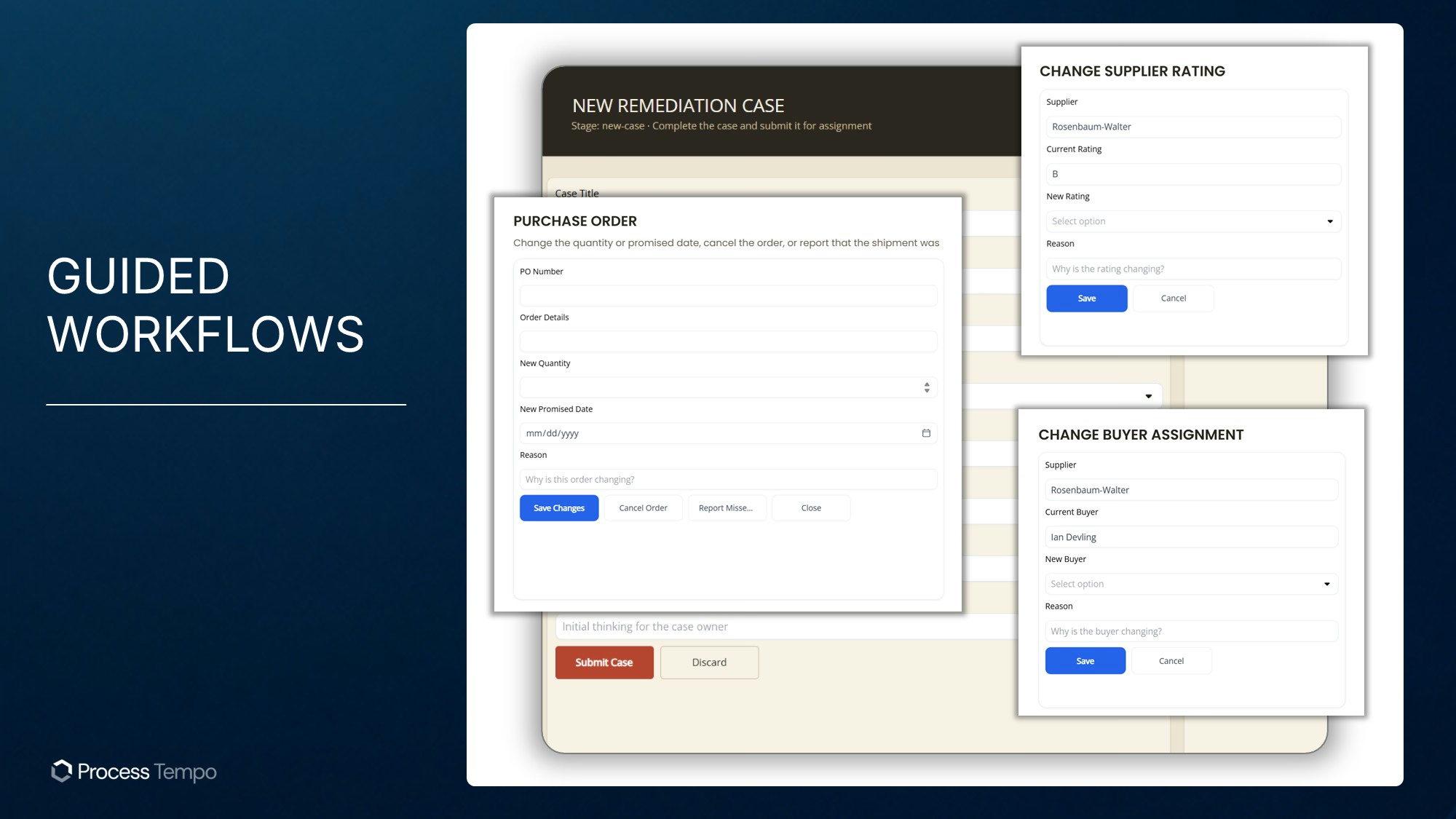
Place the next action where the user encounters the problem. In this example, a “Create remediation case” action would open a form associated with the selected supplier.
Design the form to capture the disruption, affected records, priority, responsible owner, due date, and proposed response. Carry relevant identifiers forward from the investigation so users do not have to re-enter them.
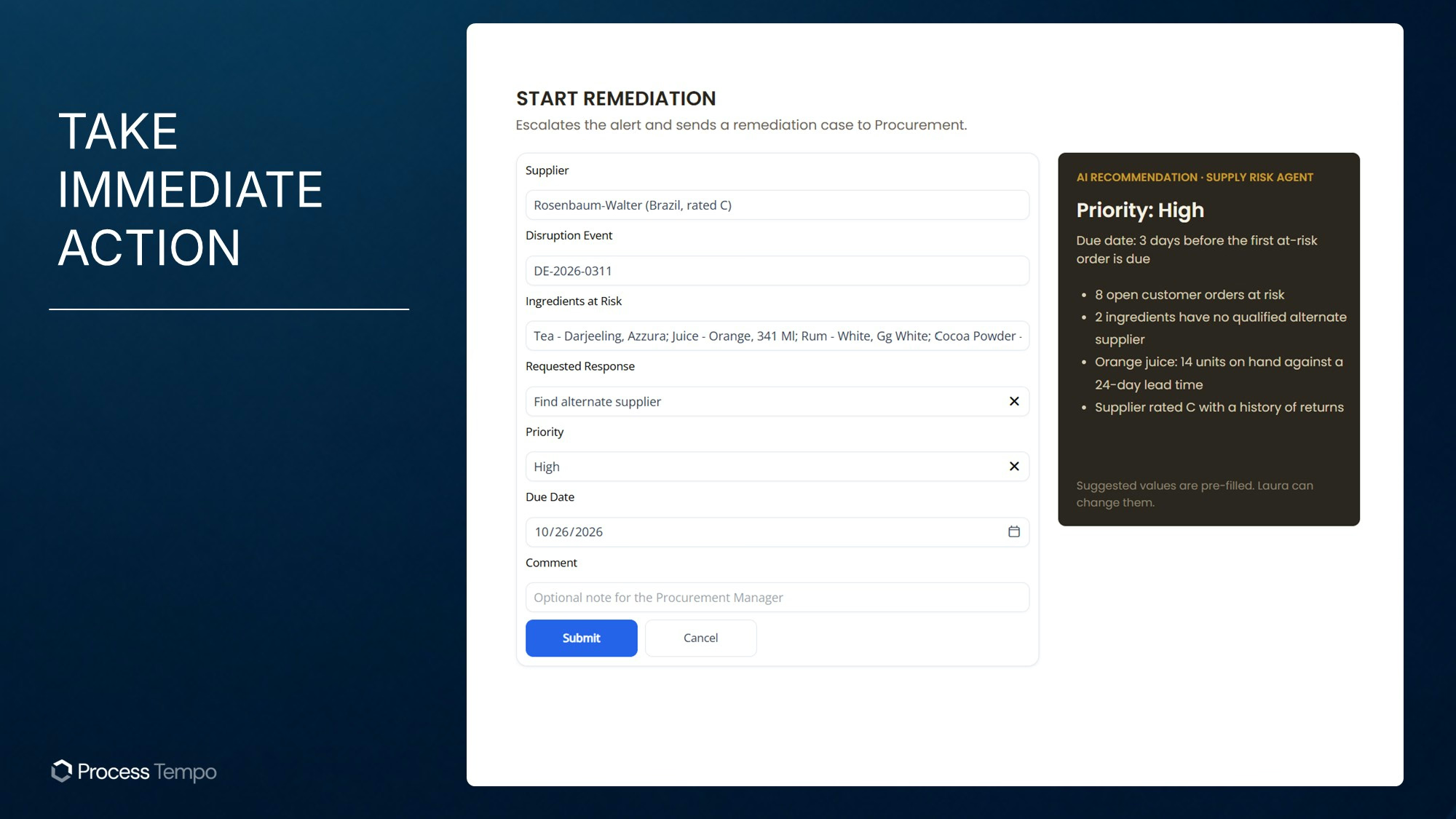
Use validation to make the case actionable. Require an owner before submission, confirm that the selected records still exist, and check that the proposed due date is appropriate. Decide which fields a user may change and which values should come from trusted data sources.
The application should give a clear result after submission and handle repeated clicks without creating duplicate cases. The design needs to cover failed updates as well as successful ones.
A case becomes useful when someone owns its resolution. Design an approval flow that moves it through defined states, such as Open, Under Review, Awaiting Approval, Approved, and Closed.
The procurement specialist might propose an alternate supplier and attach supporting evidence. The manager reviews the proposal, approves or rejects it, and records a reason. A rejection should return the case to a responsible owner with a clear next step.
Jupiter provides an application foundation with security, auditing, and governance capabilities. [4] Configure and verify those controls for the workflow: hiding an approval button is not sufficient authorization, and a generic activity log may not capture every business detail your organization requires.
For an update to another system, define how the application confirms success and handles a failed request. An approved case and a completed ERP update are different events. Make both visible so users can resolve exceptions.
There are two useful roles for AI: helping teams build the application and helping users complete a business process.
Galileo supports natural-language assistance for creating Jupiter applications, and Jupiter's MCP capabilities provide a way for third-party AI integrations to create platform artifacts. [4] Builders can use that assistance while still reviewing queries, permissions, and application behavior.
Within the supplier workflow, an AI integration could summarize the disruption, explain affected dependencies, or draft a proposed response from approved information. Design the recommendation to show its evidence and give the user a clear opportunity to review it.
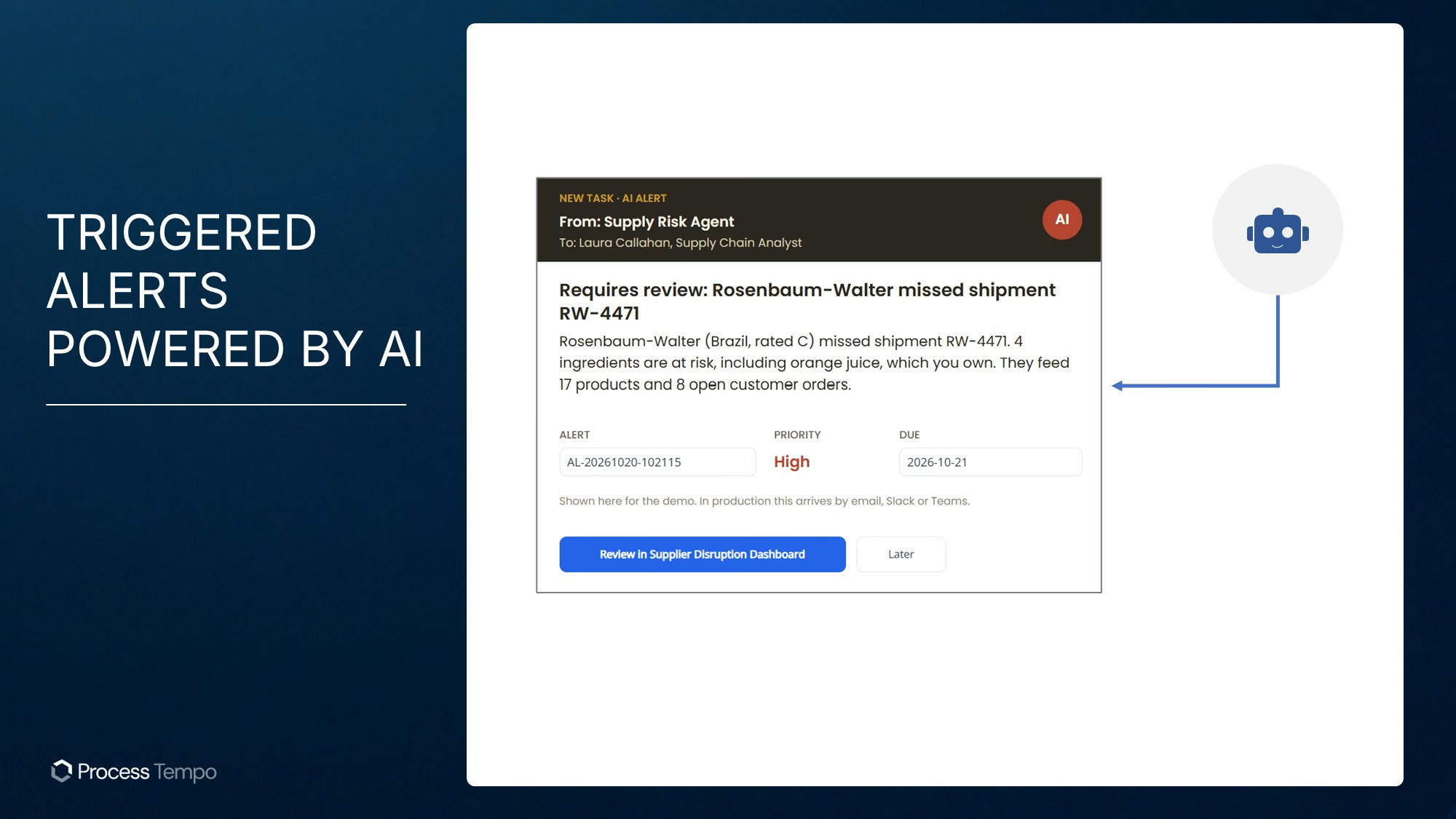
Define the agent's permitted actions explicitly. It might draft a recommendation or prepare a case, while a named person approves a supplier change. If you authorize automated actions, specify their limits, record their outcomes, and provide a way to handle failures.
This is the practical goal of operational AI: assistance that participates in a defined process and helps work move toward a verified outcome.
Test the workflow with representative users and realistic data. Verify permissions for each role, validation failures, rejected approvals, repeated submissions, and unavailable integrations. Measure query and screen performance under the workload you expect.
Agree on support ownership, monitoring, backup and recovery responsibilities, and the process for changing business rules. A shared platform reduces the infrastructure each application must assemble, but your team still owns the application's configuration and behavior.
Then measure business outcomes: time to assign a case, time to reach a decision, overdue tasks, and time to resolve the disruption. Those measures show whether the application is improving the process.
The same application foundation can support other connected business problems. A maintenance team could investigate asset dependencies and initiate a work request. A compliance team could connect a failed control to affected processes and assign corrective actions. An IT team could review service dependencies before approving a change.
Evaluate reuse across those scenarios: shared data connections, interface patterns, roles, and administration. Reuse only where the underlying requirements match; each workflow still needs its own business rules and testing.
Yes. A platform such as Jupiter provides a visual environment for building interfaces and workflows around connected data. You still need to define the data model, queries, business rules, and access requirements. Specialized integrations may require additional development.
Graph visualization helps people inspect relationships. A business application also gives them a defined way to act: submit information, assign responsibility, approve changes, update records, and track completion. A single interface can support both.
The database is one part of readiness. Evaluate the complete application, including authentication, authorization, validation, audit requirements, integrations, performance, and operating procedures.
An AI-enabled application can use graph context to support recommendations and permitted actions. The implementation must define accessible data, authorized tools, approval requirements, and how outcomes are recorded. These controls depend on the application you design.
Start with one connected business problem and the action required to resolve it. Bring the graph, supporting information, forms, and workflow together so users can carry a finding through to completion.
For more background on the platform approach, read Process Tempo and Neo4j or explore our knowledge graph solutions.
Bring your Neo4j use case. Schedule a discussion with Process Tempo to explore how Jupiter can turn it into a working business application.



Build enterprise-ready applications without writing code.
