October 7, 2026
Gartner suggests that by 2028, 75% of all enterprise applications will be built by no-code/low-code platforms (source). This is a significant amount of growth in a very short amount of time.
What’s not keeping up to speed? Enterprise governance and control mechanisms.
How do you keep business users across dozens of different divisions and departments from turning your application infrastructure into a tangled hot mess – while also expanding the organization’s surface area to outside threats? Enterprises that have already tapped into no-code/low-code platforms know the real cost of these platforms isn't the license fee: it's the governance effort required to reduce this risk.
The Microsoft Power Platform and Process Tempo Jupiter take genuinely different architectural approaches to address this problem, and that difference shows up directly in what administrators have to build versus what they get out of the box.
First, it’s important to clarify: Power Platform is a suite of separate products – Power Apps, Power Automate, Power Pages, and Power BI – each with its own admin center, its own permission model, and its own artifact types (apps, flows, sites, reports). They share an identity layer (Microsoft Entra) and increasingly share Dataverse as a common data store, but governance has to be assembled across four distinct tools.
Process Tempo Jupiter takes the opposite approach: it combines dashboarding, workflows, and application design into a single platform and artifact model, rather than stitching together separate products. This consolidation is a deliberate response to the shadow-IT problem. A unified platform gives organizations more inherent transparency than a patchwork of spreadsheets, custom code, and disconnected tools, because there’s one place to look rather than several.
That single distinction – one governed surface vs. four connected surfaces – is what drives most of the differences below.
To implement a mature governance practice on the Microsoft Power Platform, you’re typically relying on controls that Microsoft provides for you but doesn’t turn on:
None of this is a knock on the platform's capability: Power Platform’s governance controls are genuinely deep once configured (DLP, tenant isolation, Managed Environments, Purview scanning). The point is that that depth comes with assembly required, and the four-product structure means governance decisions get made four times, once per tool.
Because Jupiter treats dashboarding, workflows, and app design as one artifact type inside one platform, the governance surface is smaller by design:
There is no governance without transparency, so the ability to answer questions such as: who can do what? Who has done what? needs to be called out.
This is the more interesting gap, and Microsoft’s own documentation inadvertently proves the point. Power Platform captures access information, but it’s spread across separate log stores: Dataverse auditing logs record-level changes and access within a given environment; Power BI writes to both the tenant-wide unified audit log and an additional Power BI-specific activity log; DLP policy changes are written to the unified audit log; and none of these are the same database.
Microsoft’s own Center of Excellence (CoE) Starter Kit setup guide makes this explicit. To get app-usage data (who launched an app, how often) into one reportable place, the recommended approach is to build a Power Automate flow that queries the unified audit log every day and writes the results into a Dataverse table – specifically so the CoE Power BI dashboard has something to report on. In other words, Microsoft’s own governance toolkit exists in part because the audit data doesn’t start out in one searchable database. You’re building the “single database” yourself, using a flow as an add-on step.
Jupiter avoids this by construction: if artifacts, permissions, and access logs all live in the same repository, “Who built this?”, “Who can access it?” and “Who has actually opened it?” are simple database queries, not a daily sync job stitching together two log stores that were never designed to be queried together.
This is a real advantage of the consolidated model, and it’s worth weighing seriously – not as a minor implementation detail, but as a structural governance difference.
Governance doesn’t stop at data and access – it extends to a question that’s easy to overlook until an audit or a true-up bill forces it: Do we actually know how many licenses we need, and are we paying for the right ones?
Power Platform’s licensing is split across each product, each with its own model:
Each of these interacts with the others. A user might be covered for basic Power Apps use by their M365 seeded entitlement, but the moment their app touches a premium connector or Dataverse, they silently cross into needing a standalone license – and nothing forces that to surface until an audit finds it. This is a well-documented enterprise pain point: license consultancies now do brisk business specifically auditing Power Platform tenants for exactly this kind of drift, and true-up exposure running into the hundreds of thousands or millions of dollars at large organizations is common enough to be a standard case study in that industry.
Answering “Do we have enough licenses for actual demand?” is therefore not a single report.
Instead, it requires cross-referencing Power Apps assignment data, Power Automate flow ownership and run volumes, Power BI Pro/PPU/Premium assignments, Power Pages login/capacity consumption, and Dataverse storage capacity – five different supply-and-demand pictures, each living in a different part of the admin experience, several of them consumption-based and therefore moving targets rather than fixed counts. Getting an accurate, current answer typically means either building a reporting layer yourself (again, often via the CoE Starter Kit) or bringing in a third party whose entire business model is untangling this mess.
Process Tempo Jupiter collapses license admin to two variables: named Designer seats (who can build) and server/environment counts (Dev, Test, Prod). With Jupiter, there are no consumer licenses required, and no per-flow or consumption-based charge sitting underneath it. That has two direct governance consequences:
The genuine trade-off is what you'd expect from the rest of this comparison: Power Platform's granularity – different prices for builders vs. viewers, for light automation vs. heavy automation, for casual users vs. power users – offers real levers to optimize cost at scale, but only if you’re willing to invest in tracking it.
Jupiter's flat Designer-plus-server model trades away that fine-grained optimization for predictability: the cost doesn’t change based on how many people view a dashboard or how often a workflow runs, which is simpler to govern precisely because there’s less to govern. For an organization whose priority is knowing its license position with confidence rather than fine-tuning cost per consumption tier, that’s a meaningful governance advantage.
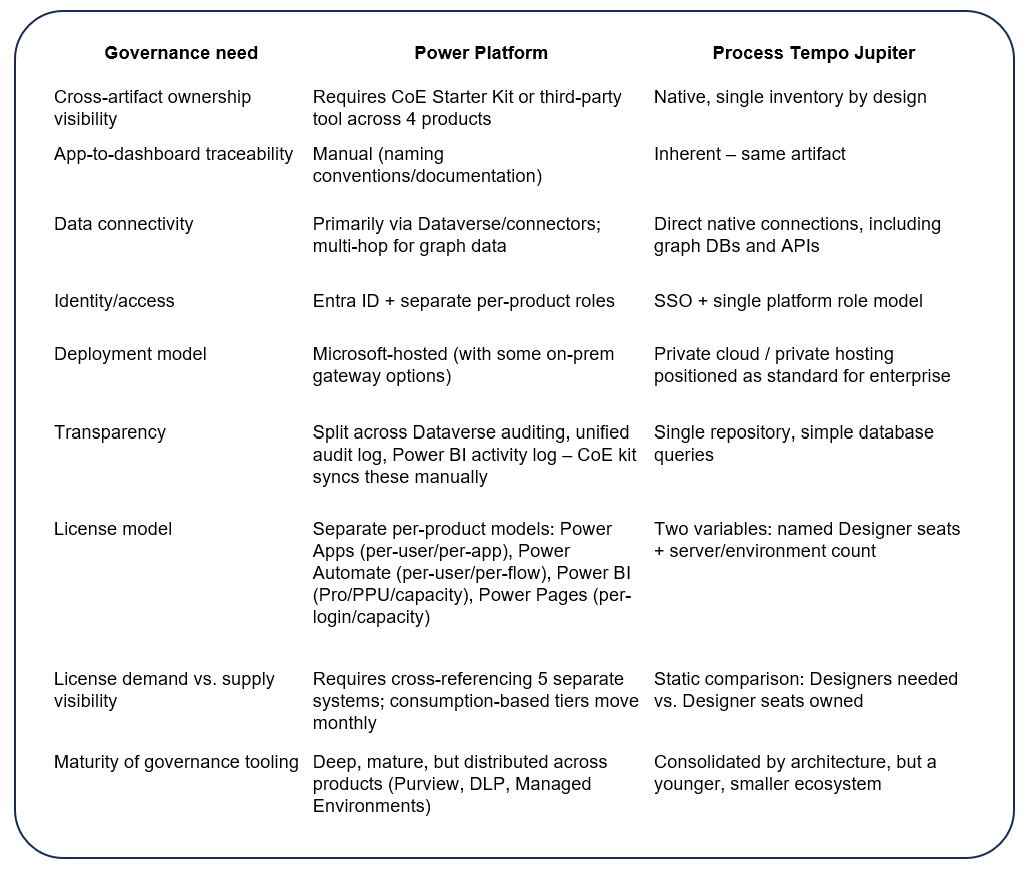
It would be misleading to frame this as one platform simply being “more governed” than the other – they’re solving the problem from opposite directions, and each direction has a genuine strength.
Power Platform’s governance tooling (Purview lineage, DLP policies, Managed Environments, tenant isolation) is deep and granular because the platform has existed longer and Microsoft has invested heavily in enterprise IT controls. The cost is that this depth is spread across four products with four log stores, so an organization has to actively assemble it – the CoE audit-log flow described above is a good example of governance capability that exists, but only after you build the plumbing to connect it.
Process Tempo Jupiter’s architecture removes the need for that plumbing in the first place.
When artifacts, permissions, and access logs all live in one repository, “who built this, who can access it, and who has actually opened it?” is a direct query rather than a reconciliation exercise across systems that weren’t designed to be queried together. That’s not a lesser version of governance that happens to be simpler – a smaller, unified surface is, on its own terms, easier to secure, easier to audit, and harder to leave a gap in, precisely because there’s nothing to reconcile.
Fewer moving parts means fewer places for ownership or access data to drift out of sync, and no dependency on a separate ecosystem of connectors or add-ons to get a complete picture.
If your organization is already deep in the Microsoft ecosystem and already has a mature Microsoft governance practice in place, then it’s likely easier to build new applications using the Microsoft Power Platform than to justify a transition to a low-code platform such as Process Tempo Jupiter.
If a mature governance practice does not exist, or if the cost of the administration and governance of these systems sit at a line of business level, the equation tilts into Jupiter’s favor. If that describes you, let’s chat.



Build enterprise-ready applications without writing code.
